Hindi Typing Tool

Type in English and get instant Hindi text. No Hindi keyboard required!

Just type phonetically and press Space — the text converts to Hindi instantly. Click any word to see alternate spellings.

English to Hindi Converter

0 characters 0 words check_circle Draft saved

Popular Hindi Phrases

  • Namaste नमस्ते
  • Aap kaise hain? आप कैसे हैं?
  • Main theek hoon. मैं ठीक हूँ।
  • Dhanyavaad. धन्यवाद।
  • Kripya. कृपया।
  • Maaf kijiye. माफ़ कीजिए।
  • Aapka naam kya hai? आपका नाम क्या है?
  • Haan. हाँ।
  • Nahi. नहीं।
  • Shubh raatri. शुभ रात्रि।
  • Bahut dhanyavaad. बहुत धन्यवाद।

English to Hindi Typing Tool — Write in Hindi Easily

Our free online Hindi typing tool lets you type in English and instantly get Hindi script. This English-to-Hindi transliteration tool is ideal for anyone who wants to write in Hindi without a Hindi keyboard.

How to Use This Hindi Typing Tool

  1. Type your text phonetically in English in the input box above.
  2. Press Space — the last word converts to Hindi script immediately.
  3. Click any converted word (or press Backspace) to see alternative spellings.
  4. Copy, Share, or Download your final Hindi text.
Example: Type “namaste aap kaise hain?” → नमस्ते आप कैसे हैं?

Why Use Our Hindi Typing Tool?

  • No Hindi keyboard required — type phonetically in Roman letters.
  • Powered by Google's transliteration API — highly accurate results.
  • Auto-saves drafts — your text is saved locally and survives page refreshes.
  • Works on all devices — mobile, tablet, or desktop.
  • Completely free — no registration or payment needed.
  • Dark mode — easy on the eyes for extended typing sessions.

Frequently Asked Questions

The tool sends each word you type to a transliteration API that phonetically maps Roman letters to Hindi script. When you press Space, the word is instantly converted and you can pick from suggested alternatives.

Yes — completely free with no registration, no subscription, and no hidden fees.

Absolutely. The tool is fully responsive and works on any modern smartphone, tablet, or desktop browser.

An internet connection is required because transliteration is processed via an online API. However, any draft you save locally is accessible offline.

Yes — output is standard Unicode Hindi, so you can paste it into websites, apps, social media, documents, and emails.

No. This is a transliteration tool — it converts the sounds of words from Roman letters to Hindi script. It does not translate meaning between languages.

No. Your text is never stored on our servers. Drafts are saved only in your browser's localStorage and are not transmitted to us.

Yes — click the 'Save .txt' button to download your text as a plain-text file named with the date.

No installation needed. The tool runs entirely in your browser and outputs standard Unicode — no special fonts required.

Click or tap the converted word to see up to 5 alternate spellings. You can also press Backspace to reopen the suggestion list for the last word.

Hindi Typing Tips

  • tips_and_updates Type as the word sounds in your mouth.
  • tips_and_updates Press Space after each word to convert.
  • tips_and_updates Click a word to pick an alternate form.
  • tips_and_updates Use ↑↓ to navigate suggestions.
  • tips_and_updates Ctrl+S downloads your text as .txt.

About Hindi Language

Hindi is an Indo-Aryan language spoken by over 600 million people, making it one of the most spoken languages in the world. It is the official language of India and is used widely in government, education, literature, and mass media.

Hindi uses the Devanagari script — a phonetic script written left to right with 47 characters (vowels and consonants). The same script is used for Sanskrit, Marathi, and Nepali.

Bollywood and India's literary tradition have carried Hindi to global audiences. With our tool, you can type Hindi using a standard English keyboard — no downloads or special fonts required.

Features

speed

Instant

Real-time conversion

verified

Accurate

Google API powered

devices

All Devices

Mobile & desktop

save

Auto-Save

Draft preserved

dark_mode

Dark Mode

Easy on eyes

lock_open

Free

No cost ever

How to Type in Hindi

Hindi typing is very easy with our tool. Simply type in English as you would in a message and press the space bar — it converts to Hindi automatically. If the converted word is not what you wanted, click on it (or press Backspace) to open the suggestion list and choose the correct form.

1. Type with your English keyboard and press Space.

2. Your English word gets converted to Hindi script instantly.

3. Click any converted word to view and select alternative transliterations.

4. If the desired word is not in the suggestions, try a slightly different spelling — the engine is phonetic, so match the sound of the word.

5. Use the Save .txt button to download your typed text as a file.

Hindi Typing Tool — Type Hindi with an English Keyboard

Type in English (Roman letters) and get instant Hindi text. No Hindi keyboard or special fonts required — just type phonetically and press Space to convert. Click a word to see more options. Works on mobile and desktop, outputs clean Unicode Hindi.

Why Use This Tool?

Example Phrases (English → Hindi)

Type in English Converts to Hindi
Namaste नमस्ते
Aap kaise hain? आप कैसे हैं?
Main theek hoon. मैं ठीक हूँ।
Dhanyavaad. धन्यवाद।
Kripya. कृपया।
Maaf kijiye. माफ़ कीजिए।
Aapka naam kya hai? आपका नाम क्या है?
Haan. हाँ।
Nahi. नहीं।
Shubh raatri. शुभ रात्रि।
Bahut dhanyavaad. बहुत धन्यवाद।

Tips for Best Accuracy

Also Try Our Other Indian Language Typing Tools

Gujarati Typing Tool · Bengali Typing Tool · Punjabi Typing Tool · Marathi Typing Tool · Tamil Typing Tool · Telugu Typing Tool · Kannada Typing Tool · Malayalam Typing Tool · Urdu Typing Tool ·

Hindi Alphabets
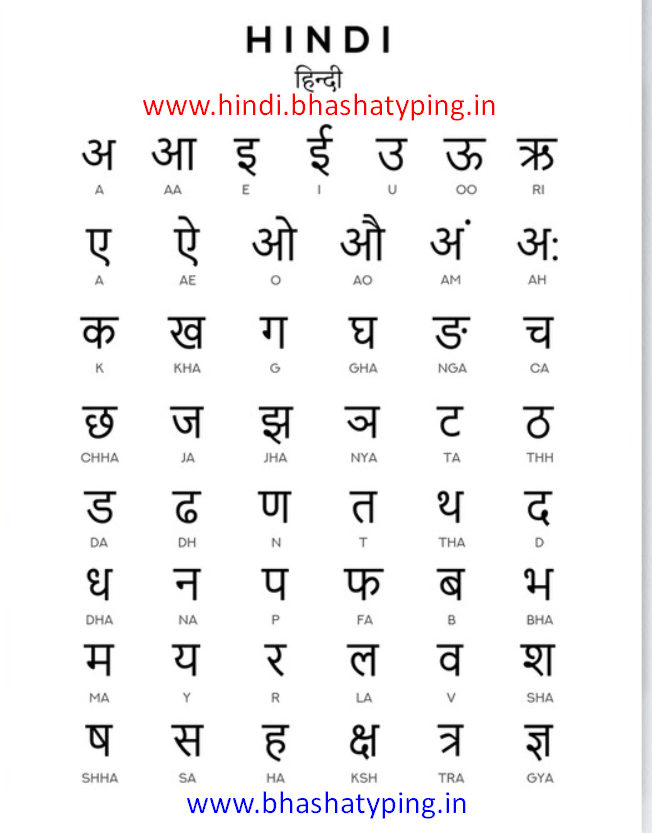
Hindi alphabets chart showing all letters